Professional Computer Instructor Training
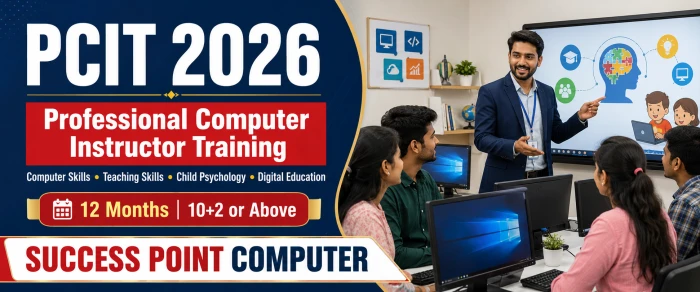
Professional Computer Instructor Training
Course Description
PCIT 2026
Professional Computer Instructor Training
Computer Skills • Teaching Skills • Child Psychology • Digital Education
Course Overview
कंप्यूटर ज्ञान के साथ प्रभावी teaching और student understanding की professional training
PCIT किसके लिए है?
PCIT एक practical और job-oriented programme है, जो विद्यार्थियों को modern computer applications चलाने के साथ उन्हें सरल, व्यवस्थित और learner-friendly तरीके से सिखाने की क्षमता विकसित करता है। यह school learners, college students, job seekers, adults और first-time computer users को train करने के लिए आवश्यक digital और instructional skills प्रदान करता है।
Course में classroom learning, computer lab practice, case studies, lesson planning, micro-teaching, supervised practice और professional portfolio शामिल हैं।
Course Objectives
- Strong computer and digital-work skills विकसित करना
- Technical topics को सरल भाषा में समझाना
- Students की age, pace और prior knowledge को समझना
- Lesson plan, worksheet और assessment तैयार करना
- Computer lab को सुरक्षित और व्यवस्थित चलाना
- AI और digital teaching tools का responsible use करना
Programme Highlights
Technology knowledge से लेकर real classroom delivery तक
18 Detailed Modules
Core computer, advanced skills और teaching modules का balanced structure
Child Psychology
Learning behaviour, motivation, inclusion और student support
Modern Digital Skills
AI tools, cyber safety, cloud, graphics, web और programming
Teaching Practice
Lesson plans, micro-teaching, supervised practice और portfolio
Complete Course Syllabus
किसी Module को खोलने के लिए उसके title पर click करें
Computer Fundamentals and Core Applications
01 Computer Fundamentals and Hardware Basicsकंप्यूटर की मूलभूत जानकारी एवं हार्डवेयर 16 Hours
Topics Covered
- Computer meaning, characteristics, limitations and applications
- Input–Process–Output–Storage cycle
- Types of computers and modern digital devices
- Data, information and digital storage units
- Computer generations and development
- Motherboard, CPU, RAM, ROM and cache
- HDD, SSD and removable storage
- Input, output and communication devices
- USB, HDMI, VGA, audio and network ports
- System, application and utility software
- Licensed, freeware and open-source software
- Computer care, electrical safety and e-waste
02 Operating System, Windows 11 and File Managementऑपरेटिंग सिस्टम, विंडोज 11 एवं फाइल प्रबंधन 20 Hours
Topics Covered
- Operating system meaning and functions
- Windows 11 interface, Start, Search and Taskbar
- Desktop, shortcuts, themes and display settings
- Window controls and multitasking
- User accounts and accessibility basics
- Drives, files, folders, paths and extensions
- Create, rename, copy, move and delete operations
- File Explorer, search, sort and view options
- Recycle Bin and permanent deletion
- ZIP compression and extraction
- Installing authorised applications
- Task Manager and basic troubleshooting
- Notepad, Calculator, Paint and Snipping Tool
- Useful Windows keyboard shortcuts
03 MS Word and Professional Documentationएमएस वर्ड एवं प्रोफेशनल डॉक्यूमेंटेशन 24 Hours
Topics Covered
- Word interface, Ribbon, tabs and views
- Create, open, save and protect documents
- Text editing and clipboard operations
- Font and paragraph formatting
- Alignment, indentation, tabs and spacing
- Bullets, numbering, borders and styles
- Page setup, columns and breaks
- Tables, pictures, shapes and SmartArt
- Header, footer, watermark and page number
- Find, Replace, spelling and Word Count
- Mail Merge for letters and certificates
- Comments and Track Changes
- Printing and PDF export
- Hindi Unicode and bilingual documents
04 MS Excel and Advanced Data Managementएमएस एक्सेल एवं उन्नत डेटा प्रबंधन 32 Hours
Topics Covered
- Workbook, worksheet, cell and range
- Data entry, AutoFill and Flash Fill
- Formatting and number formats
- Relative, absolute and mixed references
- Formula construction and operators
- SUM, AVERAGE, MIN, MAX and COUNT
- ROUND, SUBTOTAL and conditional functions
- IF, IFS, AND, OR and IFERROR
- SUMIF, SUMIFS, COUNTIF and COUNTIFS
- Text, date and time functions
- VLOOKUP, HLOOKUP, XLOOKUP, INDEX and MATCH
- Sorting, filtering and data validation
- Conditional Formatting and Remove Duplicates
- Charts, Pivot Tables and Pivot Charts
- Goal Seek and What-If Analysis basics
- Sheet protection, printing and PDF export
05 MS PowerPoint and Multimedia Presentationएमएस पावरपॉइंट एवं मल्टीमीडिया प्रेजेंटेशन 20 Hours
Topics Covered
- Slides, layouts, placeholders and themes
- Creating and organising slides
- Readable text and visual hierarchy
- Pictures, icons, shapes and SmartArt
- Tables, charts and Excel data
- Transitions and animations
- Audio, video and hyperlinks
- Slide Master and consistent design
- Speaker Notes and Presenter View
- Rehearse Timings and slide show
- Handouts, PDF and video export
- Principles of educational presentations
06 Internet, E-mail, Cloud Storage and Digital Servicesइंटरनेट, ई-मेल, क्लाउड स्टोरेज एवं डिजिटल सेवाएँ 16 Hours
Topics Covered
- Internet, web, URL, browser and search engine
- Effective search and source checking
- Tabs, bookmarks, history and downloads
- E-mail account and inbox management
- Reply, Forward, CC, BCC and attachments
- E-mail signature, labels and spam
- Google Drive or OneDrive basics
- Sharing permissions and collaboration
- Online forms and calendars
- Video-meeting fundamentals
- Document upload and file conversion
- Digital services and payment safety
07 Hindi and English Typing and Office Productivityहिंदी–अंग्रेजी टाइपिंग एवं ऑफिस प्रोडक्टिविटी 16 Hours
Topics Covered
- Correct posture and keyboard position
- Home, upper, lower and number rows
- Touch-typing and accuracy building
- English typing practice
- Hindi Unicode typing
- Punctuation and special characters
- Speed, accuracy and error measurement
- Windows and Office shortcuts
- Professional file naming
- Printing, scanning and PDF basics
Advanced and Job-Oriented Digital Skills
08 Basic Accounting and TallyPrime with GST Fundamentalsबेसिक अकाउंटिंग एवं टैलीप्राइम विद जीएसटी 32 Hours
Topics Covered
- Accounting meaning and basic terms
- Assets, liabilities, capital, income and expense
- Debit, credit and accounting rules
- Source documents and vouchers
- TallyPrime interface and company creation
- Groups, ledgers and inventory masters
- Payment, Receipt, Contra and Journal
- Purchase, Sales, Debit Note and Credit Note
- Basic inventory management
- GST concepts and tax structure
- Basic GST masters and transactions
- Day Book, Trial Balance and final reports
- Backup, restore, export and security
09 Graphic Designing and DTPग्राफिक डिजाइनिंग एवं डेस्कटॉप पब्लिशिंग 24 Hours
Topics Covered
- Design elements and principles
- Colour, contrast, alignment and hierarchy
- Resolution, dimensions and file formats
- Canva templates and brand consistency
- Educational posters and certificates
- Photoshop interface, selections and layers
- Text, colour correction and background removal
- CorelDRAW vector objects and page layout
- Identity cards, banners and pamphlets
- Print setup, margins and bleed basics
- Copyright and responsible asset use
10 HTML5, CSS3 and Basic Web DesigningHTML5, CSS3 एवं बेसिक वेब डिजाइनिंग 20 Hours
Topics Covered
- Website, webpage, domain and hosting concepts
- HTML5 document structure
- Headings, paragraphs and lists
- Links, images, tables and forms
- Semantic HTML elements
- Inline, internal and external CSS
- Colours, fonts, borders and spacing
- CSS box model
- Basic responsive design
- Navigation and page sections
- Browser Developer Tools
- Basic web accessibility
11 Programming Logic with C and Python Introductionप्रोग्रामिंग लॉजिक, C एवं Python का परिचय 20 Hours
Topics Covered
- Program, language, compiler and interpreter
- Algorithms, flowcharts and pseudocode
- Variables, constants and data types
- Input, output and operators
- Conditional statements
- Loops and repetitive tasks
- Functions and modular thinking
- Arrays or lists and strings
- Basic C program structure
- Python syntax introduction
- Debugging simple errors
- Teaching coding through tracing
12 Cyber Security and Digital Safetyसाइबर सुरक्षा एवं डिजिटल सेफ्टी 12 Hours
Topics Covered
- Cyber security, privacy and digital footprint
- Strong passwords and two-factor authentication
- Phishing, scams and social engineering
- Malware, ransomware and antivirus
- Safe downloads, Wi-Fi and USB use
- Data backup and recovery awareness
- Social-media privacy
- Cyberbullying awareness and reporting
- Digital-payment and OTP safety
- Student safety in labs and online classes
13 Artificial Intelligence and Digital Teaching Toolsआर्टिफिशियल इंटेलिजेंस एवं डिजिटल टीचिंग टूल्स 16 Hours
Topics Covered
- AI, Machine Learning and Generative AI basics
- Capabilities and limitations of AI
- Prompt writing for educational work
- Lesson ideas, quizzes and worksheets
- Notices, e-mails and feedback drafting
- AI assistance for presentations and images
- Accuracy, bias and output checking
- Student-data and institutional privacy
- Copyright, plagiarism and academic integrity
- Smart classroom and screen recording
- LMS and online assessment tools
- Blended and online learning basics
Child Psychology, Pedagogy and Classroom Practice
14 Child Psychology, Learning Behaviour and Inclusive Teaching CORE MODULEबाल मनोविज्ञान, सीखने का व्यवहार एवं समावेशी शिक्षण 24 Hours
Foundations of Child and Learner Psychology
- Meaning and educational importance of child psychology
- Growth, development, maturation and learning
- Cognitive, language, social and emotional development
- General characteristics of childhood and adolescence
- Adult and first-time computer learners
- Individual differences in pace, ability and confidence
How Students Learn
- Attention, perception, memory and recall
- Connecting new knowledge with prior experience
- Learning by observation, practice and feedback
- Concept formation and step-by-step skill learning
- Cognitive load and clear instructions
- Revision, retrieval and spaced practice
Motivation, Behaviour and Inclusive Support
- Internal and external motivation
- Computer anxiety and fear of mistakes
- Growth mindset and positive reinforcement
- Supporting slow learners without labelling
- Reasons behind inattention or repeated mistakes
- Positive classroom rules and calm correction
- Learning-difficulty awareness and reasonable support
- Readable text, clear contrast and smaller task steps
- Gender, language, disability and background inclusion
- Bullying, cyberbullying and emotional safety
- Teacher–student and teacher–parent communication
- Teacher’s limit: observe and support, not diagnose
15 Teaching Methodology and Educational Technologyशिक्षण पद्धति एवं शैक्षिक प्रौद्योगिकी 24 Hours
Topics Covered
- Purpose and principles of teaching
- Professional qualities of a computer instructor
- Teacher-centred and learner-centred approaches
- Explanation, demonstration and discussion
- Questioning and checking understanding
- Activity, experiential and project-based learning
- Inquiry and problem-solving methods
- Guided, independent and peer practice
- Known to unknown and simple to complex
- Tell–Show–Do–Review sequence
- Worksheets and practical job sheets
- Online, blended and differentiated instruction
- Reflective teaching and improvement
16 Lesson Planning, Communication, Classroom and Lab Managementपाठ योजना, संचार, कक्षा एवं कंप्यूटर लैब प्रबंधन 16 Hours
Topics Covered
- Measurable learning objectives
- Components of a lesson plan
- Checking prior knowledge
- Introduction, practice and closure
- Time allocation and backup activities
- Questioning techniques and wait time
- Verbal and non-verbal communication
- Voice, pace, body language and board work
- Simple bilingual explanation
- Classroom rules and routines
- Mixed-age and mixed-ability batches
- Individual, pair and group practical work
- Computer allocation and lab safety
- Attendance and progress records
- Handling technical failure during class
17 Assessment, Student Support and Professional Ethicsमूल्यांकन, विद्यार्थी सहयोग एवं व्यावसायिक नैतिकता 12 Hours
Topics Covered
- Diagnostic, formative and summative assessment
- Assessment for, as and of learning
- Written, oral and practical assessment
- Observation checklists and rubrics
- MCQs, matching and short-answer questions
- Assessing process and final output
- Fair marking and avoiding bias
- Constructive and timely feedback
- Remedial and enrichment activities
- Attendance, marks and progress records
- Academic honesty and responsible AI use
- Confidentiality and professional boundaries
Teaching Practice, Supervised Practice and Final Project
18 Micro-Teaching, Supervised Practice and Professional Portfolioसूक्ष्म शिक्षण, सुपरवाइज्ड प्रैक्टिस एवं प्रोफेशनल पोर्टफोलियो 16 Hours+
Micro-Teaching and Practice
- Introducing and closing a lesson
- Clear explanation and practical demonstration
- Questioning and reinforcement
- Using examples and visual aids
- Time management and student participation
- Minimum five short micro-teaching sessions
- Minimum three complete practical lessons
- Peer and trainer observation
- Re-teaching after feedback
- Assisting in a real computer batch
- Lab preparation and learner support
- Attendance and practical records
Final Portfolio
- Five detailed lesson plans
- Worksheets and practical job sheets
- PowerPoint teaching presentation
- Screen-recorded computer tutorial
- Theory test and answer key
- Practical-assessment rubric
- Child-psychology case-study response
- Word, Excel, graphics and webpage samples
- Supervised-practice record
- Self-reflection and improvement plan
Month-Wise Learning Plan
12 महीनों में computer expertise से teaching practice तक structured progress
| Month | Modules and Learning Focus |
|---|---|
| Month 1 | Computer Fundamentals, Hardware Basics, Windows 11 and File Management |
| Month 2 | MS Word and Professional Documentation |
| Month 3 | MS Excel Fundamentals, Formulas and Functions |
| Month 4 | Advanced Excel, Charts, Pivot Tables and Data Management |
| Month 5 | PowerPoint, Internet, E-mail and Cloud Storage |
| Month 6 | Hindi–English Typing, Office Productivity and Core Practical Test |
| Month 7 | Basic Accounting and TallyPrime with GST Fundamentals |
| Month 8 | Graphic Designing, DTP, HTML5 and CSS3 |
| Month 9 | Programming Logic, Cyber Security, AI and Digital Teaching Tools |
| Month 10 | Child Psychology, Learning Behaviour and Inclusive Teaching |
| Month 11 | Teaching Methodology, Lesson Planning, Lab Management and Assessment |
| Month 12 | Micro-Teaching, Supervised Practice, Final Portfolio and Teaching Demonstration |
Internal Assessment Structure
Knowledge, practical performance और teaching competence का balanced evaluation
| Assessment Component | Weightage |
|---|---|
| Computer Applications Theory | 10% |
| Software and Digital Skills Practical | 30% |
| Monthly Assignments and Portfolio | 15% |
| Child Psychology and Pedagogy | 15% |
| Lesson Plan and Assessment Design | 10% |
| Micro-Teaching and Final Demonstration | 15% |
| Professional Conduct and Practice Record | 5% |
Completion Requirements
- Minimum 75% attendance
- Essential practical assignments
- Complete teaching portfolio
- Supervised teaching practice
- Minimum 40% overall score
- Minimum 50% in final demonstration
Career Opportunities
Practical competence और recruiting organisation की eligibility के अनुसार
Become a Skilled Computer Instructor
Technology सीखें, students को समझें और confidence के साथ practical computer classes conduct करें।
Course Syllabus
Computer Fundamentals and Hardware Basics
Operating System, Windows 11 and File Management
MS Word and Professional Documentation
MS Excel and Advanced Data Management
MS PowerPoint and Multimedia Presentation
Internet, E-mail, Cloud Storage and Digital Services
Hindi and English Typing and Office Productivity
ADVANCED AND JOB-ORIENTED DIGITAL SKILLS
Graphic Designing and DTP
HTML5, CSS3 and Basic Web Designing
Programming Logic with C and Python Introduction
Cyber Security and Digital Safety
Artificial Intelligence and Digital Teaching Tools
hild Psychology, Learning Behaviour and Inclusive Teaching
Teaching Methodology and Educational Technology
Lesson Planning, Communication, Classroom and Lab Management
Assessment, Student Support and Professional Ethics
Micro-Teaching, Internship and Professional Portfolio
Duration: 12 Months
Advertisements

Admission Query